
Professional Photoshop masking services are essential for precise image editing. They help separate and enhance specific parts of an image.
In today’s digital world, visuals play a crucial role in communication. Whether for personal projects or business needs, high-quality images are essential. Photoshop masking services help achieve this by isolating intricate details, ensuring clarity and impact. From e-commerce to advertising, these services enhance the appeal of images, making them stand out.
Skilled professionals use advanced techniques to deliver flawless results, saving time and effort. Understanding the importance of these services can elevate the quality of any visual content, making it more appealing and effective. Dive into the world of Photoshop masking to discover how it can transform your images.

Credit: techcloudltd.com
Introduction To Photoshop Masking
Photoshop masking is a key technique in professional photo editing. It allows precise control over which parts of an image are visible or hidden. This technique is essential for enhancing images and creating stunning visuals.
What Is Photoshop Masking?
Photoshop masking is a method used to hide or reveal parts of an image. It is like creating a stencil for your photo. By doing this, you can edit specific areas without affecting the whole image.
There are different types of masks in Photoshop:
- Layer Mask: Used to hide or reveal parts of a layer.
- Clipping Mask: Uses the content of one layer to mask another layer.
- Alpha Channel Mask: Utilizes the grayscale information of an image to create a mask.
Importance In Professional Photography
In professional photography, image quality is crucial. Photoshop masking helps in achieving this by allowing selective editing. Here are some key reasons why it is important:
- Precision: Edit specific parts without disturbing other areas.
- Flexibility: Make non-destructive edits, meaning you can reverse changes anytime.
- Enhancement: Improve image details and create dramatic effects.
Professional photographers use masking for:
| Purpose | Explanation |
|---|---|
| Background Removal | Isolate subjects from backgrounds for clean images. |
| Color Correction | Adjust colors in specific areas without affecting the whole image. |
| Compositing | Combine multiple images into one seamless composition. |
Using Photoshop masking, photographers can refine images with a high level of detail. This results in professional and polished final photos.
Types Of Masking Techniques
Professional Photoshop masking services use different techniques to enhance images. These techniques help in achieving precise and clean edits. Let’s explore some common masking techniques.
Layer Masking
Layer masking is a non-destructive way to hide parts of a layer. This technique allows you to adjust the visibility of different parts of an image without deleting any pixels. By painting on the mask with black, white, or gray, you can control the transparency of the layer.
- Black conceals parts of the layer.
- White reveals parts of the layer.
- Gray provides partial transparency.
Clipping Masking
Clipping masking involves using one layer to define the visibility of another. The bottom layer acts as a mask for the top layer. This technique is useful for applying textures, patterns, or effects to specific areas of an image.
- Create a base layer.
- Add a second layer above it.
- Use the base layer to mask the second layer.
Alpha Channel Masking
Alpha channel masking is a technique used for detailed and complex images. It involves creating a mask based on the grayscale values of an image. This technique is ideal for images with fine details like hair or fur.
| Step | Description |
|---|---|
| 1 | Create an alpha channel from the image. |
| 2 | Adjust the contrast to enhance details. |
| 3 | Apply the mask to the image. |
Benefits Of Professional Masking Services
Professional Photoshop masking services offer numerous benefits for businesses and individuals. Masking enhances the appearance of images, making them look polished and professional. This service is essential for anyone who values high-quality visuals. The benefits of professional masking services are numerous, ranging from improved image quality to saving time and money.
Enhanced Image Quality
Professional masking services improve image quality significantly. Experts use advanced techniques to create clean and precise masks. This ensures that the subject stands out clearly from the background. High-quality images are crucial for marketing materials, websites, and social media. They attract more attention and leave a lasting impression.
Time And Cost Efficiency
Using professional masking services saves time. Experts handle the complex work, freeing you to focus on other tasks. This efficiency can lead to cost savings. Outsourcing masking work is often cheaper than doing it in-house. It reduces the need for expensive software and training. By delegating this task, you can achieve professional results without significant investment.
Credit: www.upwork.com
Choosing The Right Service Provider
Choosing the right service provider for professional Photoshop masking services can be challenging. There are many options available, each promising top-quality results. Knowing what to look for can help you make an informed decision. This section will guide you through key factors to consider and questions to ask when selecting the best service provider for your needs.
Key Factors To Consider
When selecting a Photoshop masking service provider, consider the following key factors:
- Experience: Look for providers with extensive experience in the field.
- Portfolio: Review their portfolio to assess the quality of their work.
- Turnaround Time: Ensure they can meet your deadlines.
- Customer Reviews: Check reviews to see what past clients say about their services.
- Cost: Compare prices to find a service that fits your budget.
Questions To Ask
Asking the right questions can help you gauge the service provider’s reliability and expertise. Here are some important questions to ask:
- What is your experience with Photoshop masking? This question helps you understand their expertise.
- Can you provide samples of your work? Reviewing samples can give you a sense of their quality.
- What is your turnaround time? Ensure their timeline aligns with your needs.
- Do you offer revisions? It’s important to know if they allow revisions to meet your expectations.
- What are your rates? Understanding their pricing helps you plan your budget.
Choosing the right service provider for Photoshop masking is crucial. By considering key factors and asking the right questions, you can find a provider that meets your needs and delivers high-quality results.
Industry Applications
Professional Photoshop masking services have a wide range of industry applications. Masking helps in creating precise images. It is vital for various sectors. Here are some key industry applications.
E-commerce
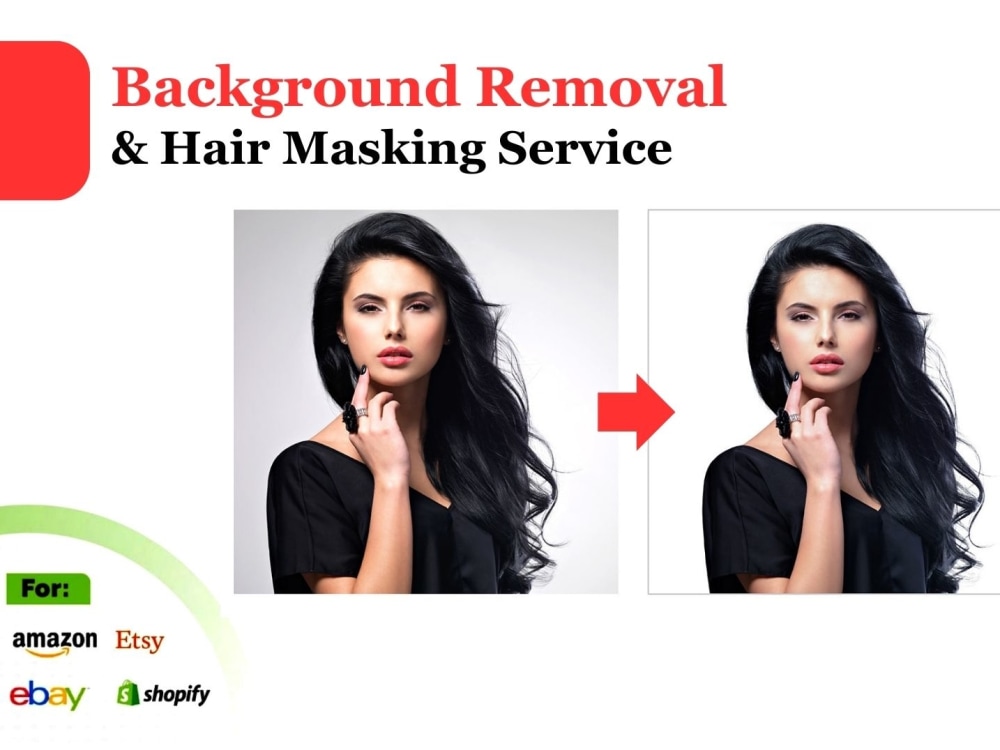
In e-commerce, product images play a crucial role. Clear, sharp photos attract buyers. Photoshop masking services remove backgrounds. They highlight products. This makes the product stand out. It improves the overall look of the online store. It enhances customer experience.
Advertising
Advertising relies heavily on visuals. Masking services help create stunning ads. They ensure every detail is perfect. They remove distractions. They focus on the main subject. This increases the ad’s effectiveness. It grabs attention easily. It drives more engagement.
Fashion Photography
Fashion photography demands perfection. Every image must look flawless. Photoshop masking services refine these photos. They eliminate unwanted elements. They enhance the model’s features. They bring out the best in the clothing. This is crucial for magazines and portfolios.

Credit: www.facebook.com
Case Studies
Professional Photoshop Masking Services can transform your images. This section delves into case studies. We’ll show how these services have helped clients. You’ll see the value and impact of expert masking through real examples.
Success Stories
Our clients have achieved outstanding results with our services. Here are a few success stories:
- Fashion Brand: A top fashion brand needed flawless images for their online store. Our team provided precise masking for their products. Sales increased by 30% due to clearer, more appealing photos.
- E-commerce Site: An e-commerce site required clean images for their catalog. We delivered high-quality masked images that enhanced their product listings. The site’s traffic and engagement improved significantly.
- Photography Studio: A photography studio wanted to offer premium retouching services. We provided advanced masking solutions. This allowed the studio to expand their service offerings and attract more clients.
Before And After Examples
Seeing is believing. Here are some before and after examples to illustrate our work:
| Before | After |
|---|---|
 |
 |
 |
 |
 |
 |
Each image demonstrates the power of professional masking. Notice the clarity and detail in the after images. These examples highlight the importance of expert editing.
Diy Vs. Professional Services
Deciding between DIY and professional Photoshop masking services can be tricky. Each option has its own benefits and drawbacks. Understanding these differences can help you make an informed choice. Let’s break down the pros and cons of each approach.
Pros And Cons Of Diy
Many people prefer to do their own Photoshop masking. It can save money and offer more control over the project. But, it also comes with some challenges.
- Pros:
- Cost-effective: No need to pay for professional services.
- Control: You have complete control over the final result.
- Learning opportunity: Improves your own Photoshop skills.
- Cons:
- Time-consuming: Masking can take a lot of time, especially for complex images.
- Lack of expertise: May not achieve professional-quality results.
- Limited tools: You may not have access to the best tools and software.
Advantages Of Professional Expertise
Professional Photoshop masking services offer many benefits. These services can save time and deliver high-quality results. Let’s explore some key advantages.
- Expertise: Professionals have extensive experience and knowledge.
- High-quality results: They use advanced tools to achieve perfect masking.
- Time-saving: Professionals can complete tasks much faster.
- Consistency: Ensures uniform quality across all your images.
- Support: Access to customer support for any issues or adjustments.
Choosing between DIY and professional services depends on your needs. Consider the importance of quality, time, and expertise for your project.
Future Trends In Image Masking
The world of professional Photoshop masking services is evolving rapidly. Businesses are seeking precision and efficiency in their image editing needs. Staying ahead means keeping an eye on future trends in image masking. Understanding these trends ensures better results and keeps your business competitive.
Technological Advancements
Artificial intelligence (AI) is transforming image masking. AI algorithms can now identify and isolate complex details. This results in faster and more accurate masking processes.
Machine learning (ML) also plays a key role. ML allows software to learn from previous edits. This means it can predict and improve future masking tasks. The combination of AI and ML leads to significant time savings.
Another exciting advancement is edge detection technology. This technology enhances precision by identifying the exact edges of objects. It ensures clean and sharp masks, even for the most intricate images.
Market Growth Projections
The demand for professional Photoshop masking services is growing. Businesses understand the importance of high-quality images. From e-commerce to advertising, visuals play a crucial role.
Experts predict a steady rise in the market for these services. The need for efficient and precise image editing will drive this growth. As technology advances, more businesses will adopt professional masking services.
Additionally, the freelance market is expanding. Freelancers offering specialized masking services are on the rise. This opens up opportunities for skilled professionals to cater to a global clientele.
Frequently Asked Questions
What Is Photoshop Masking?
Photoshop masking is a technique used to hide or reveal parts of an image. It allows precise control over which areas are visible.
Why Use Professional Photoshop Masking Services?
Professional services ensure high-quality results with precision. Experts handle complex images, saving time and achieving a polished, professional look.
How Does Photoshop Masking Improve Images?
Masking enhances images by providing clean, sharp edges. It allows seamless blending and perfect isolation of subjects.
Can Photoshop Masking Handle Hair And Fur?
Yes, professional masking services expertly manage intricate details like hair and fur. They ensure natural and realistic results.
Conclusion
Professional Photoshop masking services can enhance your images effortlessly. Quality edits create a significant impact. Engaging visuals attract more attention. Your brand looks more polished and professional. Consider investing in these services for better results. High-quality images can boost your online presence.
It’s an easy way to improve your marketing strategy. Strong visuals can make your content stand out. Enhance your images today for a stronger impression.